Track it.
Monday, June 2nd, 2008GPS is greatly used for vehicle tracking. It is very helpful especially when you want to locate someone.
GPS is greatly used for vehicle tracking. It is very helpful especially when you want to locate someone.
In this post, I will simply point out the difference between a DVI and HDMI switch. DVI ( Digital Video Interface) is an all digital video standard for transmitting superior uncompressed digital video. DVI uses 3 differential pairs to send digital R,G,B signals. A 4th differential pair is used for clocking the bits at maximum of 165 MHz. 24 bits of pixel color information ( 8 bits each for R,G,B)is transmitted per clock. The aggregate data rate is therefore 10×165MHz = 1.65 Gbps! DVI transmits in native digital ( no A/D conversions) R,G, B format that is ideal for HDTV systems.
HDMI switch, on the other hand, ( High Definition Multimedia Interface) is the state of art digital A/V connection that supports uncompressed, all-digital video and audio in a single connection. It is truly the first digital “multi-media” interconnect supporting both digital video and audio. HDMI and DVI has the same video quality. The major difference is that HDMI also supports multi-channel digital audio in the same cable! HDMI transmits in native digital ( no A/D conversions) R,G, B format that is ideal for HDTV systems.
Try to go backwards (around 5 posts) and read about my dream laptop there. It is actually one of my target products to buy this year. I’ve been mentioning about it since last year and until now I haven’t bought it. Nada. Wala. Zero. Poor me. I even checked out and canvassed for its price at BestBuy online, and other sites which offer great deals, and true that it costs $2000!! Where will I get it, for crying out loud?! Okay, enough with my drama and I have to get to my point.
Here’s the actual specification of the HP Pavilion DV6000 model:
There are also different specs but with the same model, some are Core2 Duo processor with 512 MB / 2 GB (max) DDR II SDRAM, and a whole lot more. Surf up the web and look for the specs that fits you. Well for me, the one I mentioned above will leave me happy and contented.
Talking about networking cables once again, let me elaborate what a Cat 5 cable is. It consists of four twisted pairs of copper wire terminated by RJ45 connectors. Cat-5 cabling supports frequencies up to 100 MHz and speeds up to 1000 Mbps. It can be used for ATM, token ring, 1000Base-T, 100Base-T, and 10Base-T networking. Attaching an RJ45 to the ends of the said cable is so easy. Simply get a crimper and do this.
 1. Skin off the cable jacket approximately 1″ or slightly more.
2. Un-twist each pair, and straighten each wire between the fingers.
3. Place the wires in the order of one of the two diagrams shown above (568B or 568A). Bring all of the wires together, until they touch. (Diagram: http://www.lanshack.com/make-cat5E.aspx)
4. At this point, recheck the wiring sequence with the diagram.
5. Optional: Make a mark on the wires at 1/2″ from the end of the cable jacket.
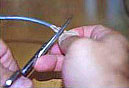 6. Hold the grouped (and sorted) wires together tightly, between the thumb, and the forefinger.
7. Cut all of the wires at a perfect 90 degree angle from the cable at 1/2″ from the end of the cable jacket. This is a very critical step. If the wires are not cut straight, they may not all make contact. We suggest using a pair of scissors for this purpose.
 7B. Conductors should be at a straight 90 degree angle, and be 1/2″ long, prior to insertion into the connector.
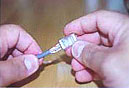 8. Insert the wires into the connector (pins facing up).
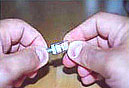 9. Push moderately hard to assure that all of the wires have reached the end of the connector. Be sure that the cable jacket goes into the back of the connector by about 3/16″.
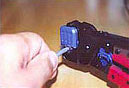 9. Place the connector into a crimp tool, and squeeze hard so that the handle reaches it’s full swing.
10. Repeat the process on the other end. For a straight through cable, use the same wiring. For a “crossover” cable, wire one end 568A, and the other end 568B.
11. Use a cable tester to test for proper continuity.
Okay, since I’ve been talking about rhinoplasty or what they simply call a “nose job”, then let us talk about the plastic surgeon who performs the operation. Once a patient has decided to undergo cosmetic surgery, he/she will have to talk with the surgeon. The surgeon, on the other hand, discusses everything the patient needs to know about his chosen surgery plus the schedule, too.
Surgeons also do reconstructive surgery. This service is for those who want to correct functional impairments caused by burns, disease, removal of cancer, and etc. Anyway, for those who wants a recap on some procedures done by them, here’s a short list.
The trend today for cosmetic surgery has boomed and people have it for physical enhancement. They have medical term used for this and here’s again a short list of the most common procedures.
Be careful in choosing your plastic surgeon or else you’ll end up like these people.
Jocelyn Wildenstein (everything!)
Michael Jackson (everything again!!)

Smile is one of the best things in the world. It sends a lot of meaning to a person whom you are smiling at. And so it is important to have your pearly whites to be a dazzling one! Take good care of your teeth by brushing after every meal and visiting you dentist twice a year. It is also nice to have a mouth spa when you visit your dentist because it includes tongue scraping, over-all teeth cleansing, teeth whitening and a lot more depending on the package you are going to choose.
And well since cosmetic surgery is part of our modern time, there is also what we call cosmetic dentistry. They specialize in dental care in which they maintain not only your teeth but also your gums and everything that surrounds it. If you happen to be in the US, there are so many clinics that offer this kind of service. Try the cosmetic dentistry in NJ, too. I heard there are lots of them there. But actually, this service is being rendered anywhere in the globe so check them out if you are interested. Remember, show those great, white assets you have. Smile!
Last night, I saw my mobile phone flickering beside me. That’s probably a sign for me to buy a new phone to replace my old one. But since I’m still out of budget, I’d rather buy some brand new rechargeable batteries for my good old phone. Can you suggest any model of mobile phone which you think would suit me? I’m still on the search looking for the best featured phone in town.
Christmas is very near. Hooray for that! Are you done with your Christmas shopping? What are the things you’re gonna buy for yourself? I’m a bit excited right now because I’d be able to buy a brand new digital camera at last. And guess what, I’d be using the money I earned from doing paid posts. Woohoo.
This one is Canon PowerShot SX100 IS Silver model. These are its highlights:
8.0 Megapixel Image Sensor
The PowerShot SX100 SL features an amazing 8.0 megapixel effective CCD to provide profound image detail with unparalleled richness and depth, and the ultimate flexibility in enlarging and cropping shots.10X Optical Zoom Lens
The PowerShot SX100 SL’s high-grade zoom lens ensures razor-sharp precision and lifelike color reproduction. With a stunning 10X optical zoom capability, easily bring far-away objects up close for inspiring and emotive shots.DIGIC III Image Processor
The DIGIC III Image Processor is the latest advancement to Canon’s DIGIC technology. Delivering superior image quality, ultra-responsive performance and extended battery life, this mighty processor also empowers the new Face Detection AF/AE (Auto Focus / Auto Exposure) functions. Automatically detect and optimize focus and exposure faces in a scene for accurate and bright people shots.Image Stabilizer
Canon Optical Image Stabilizer technology ensures awesome steady shooting with phenomenal picture clarity even when you are in motion.2.5 inch Large LCD
The PowerShot SX100 SL features a large 2.5-inch LCD with an 172,000 pixel resolution to ensure picture brightness and clarity whether setting up your shot or reviewing results.PictBridge Support
The PictBridge technology makes photograph printing easier than ever. Simply connect your PowerShot SX100 SL to any PictBridge-compatible printer, select your image and print settings and press the Print/Share button to start printing.
This one, on the other hand, is Canon Powershot SD870 IS (Black edition) model. And its features include:
8.0 Megapixel Image Sensor
The PowerShot SD870 IS features an amazing 8.0 megapixel effective CCD to provide exquisite image detail and unparalleled richness and depth, to give you maximum flexibility in enlarging and cropping shots.3.8X Wide-angle Zoom Lens
WIth the Canon 3.8X wide-angle zoom lens, the PowerShot SD870 IS handles both wide-scene and close-up shots. Get the whole family and lots of friends into one shot at the 28mm wide-angle end, or take extreme close-ups via up to 15X zoom capability (3.8X optical zoom multiplies 4X digital zoom).DIGIC III Image Processor
The DIGIC III Image Processor is the latest advancement to Canon’s DIGIC technology. Delivering superior image quality, ultra-responsive performance and extended battery life, this mighty processor uses the new Face Detection AF/AE (Auto Focus/Auto Exposure) functions. Automatically detect faces in a scene, and optimize focus and exposure accordingly for accurate and bright people shots.Ultra Large 3″ PureColor LCD Screen
The PowerShot SD870 IS’s ultra large 3-inch PureColor LCD screen delivers crisp, clear pictures, whether you’re shooting, reviewing or showing off your images. The anti-reflective screen with tough scratch-resistant coating provides extra durability for outdoor use. The screen also features Night Display for easy viewing in low light.Image Stabilizer
Canon Optical Image Stabilizer technology ensures awesome steady shooting with phenomenal picture clarity even when you are in motion.PictBridge Support
The PictBridge technology makes photograph printing easier than ever. Simply connect your PowerShot SD870 IS to any PictBridge-compatible printer, select your image and print settings and press the Print/Share button to start printing.
I’m still undecided which camera I’d want to have. Their features are almost similar. But the SD870 is an ultra-compact camera which means you can bring it anywhere, anytime. Both have rechargeable batteries but SX-100 uses 2 AA Ni-MH battery while the other one uses a “cellphone-like” battery. Please help me with this? Any suggestions or comments are welcome. Thanks! 
I feel very fortunate to be living in this modern world where computers and other super machines and gadgets are existing. They make our lives easier and more convenient. Internet is also one of the greatest inventions actually because it allows us to connect in different parts of the world and keep in touch with anyone through the cyber world.
Internet is so useful for me because it allows me search anything - simple click and query and the answer is right in front of your screen. It also enables me to send message to anyone through emails, messengers, and blogs, too. Speaking of electronic mails, I happened to be a part of some Mailing Lists. I enjoyed reading new updates and telling them how I feel about some things they discuss. Martin Worldwide actually is one of the greatest and most successful mailing list provider there is in the universe. Since they’ve been up for more than a decade now, expect them to render their clients the best services they could offer like business mailing list, marketing list and so much more. This company compiles lists of their millions of customers throught a powerful database. To know more about them, visit them and see what they have to offer you.
‘Tis the season to be jollyLa-la-la-la-laLa-la-la-la.”
Christmas is very near - a month plus a week more to go and we’ll be celebrating it! Christmas shoppers will be around once again in the malls and online, too. But I don’t think people will be seen in the malls that much because of the bomb/explosion last October which I am sure scared a lot of people. So for those who doesn’t want to hang around the malls and get squashed by other shoppers, why don’t you try to shop for your things online? If you plan to buy a brand new TV set or a 5.1 Digital Surround sound or any appliances this season, you might want to check out Krillion. You will be able to choose from a wide variety of TVs (imagine a new sony 32 inch LCD sitting in front of your living room) and major appliances at a very reasonable price. Check it out right now and compare the prices of the products you want in the comfort of your home. Good luck!